出于安全的考虑,多用户操作系统需要具备保障个人隐私和系统安全的机制。在Linux中,无论是文档还是硬件设备都以文件的形式存在,相应地,安全机制也主要表现为对文件访问权限的控制。
文件权限
使用 ls 命令的 -l 选项可以查看指定目录下的文件和目录的权限,例如:
$ ls -l /path/to/directory
total 128
drwxr-xr-x 2 archie users  4096 Jul  5 21:03 Desktop
drwxr-xr-x 6 archie users  4096 Jul  5 17:37 Documents
drwxr-xr-x 2 archie users  4096 Jul  5 13:45 Downloads
-rw-rw-r-- 1 archie users  5120 Jun 27 08:28 customers.ods
-rw-r--r-- 1 archie users  3339 Jun 27 08:28 todo
-rwxr-xr-x 1 archie users  2048 Jul  6 12:56 myscript.sh
其中第一列中像 drwxr-xr-x 、 -rw-rw-r– 这样的字符串表示文件的权限(不包括第一个字符),以第一个字符串为例:
| d | rwx | r-x | r-x |
|---|---|---|---|
| The file type, technically not part of its permissions. See info ls -n “What information is listed” for an explanation of the possible values. | The permissions that the owner has over the file, explained below. | The permissions that the group has over the file, explained below. | The permissions that all the other users have over the file, explained below. |
可以看到文件权限是由3个三元组(e.g. rwx)组成的,每个三元组可以有下表所示的字符组成:
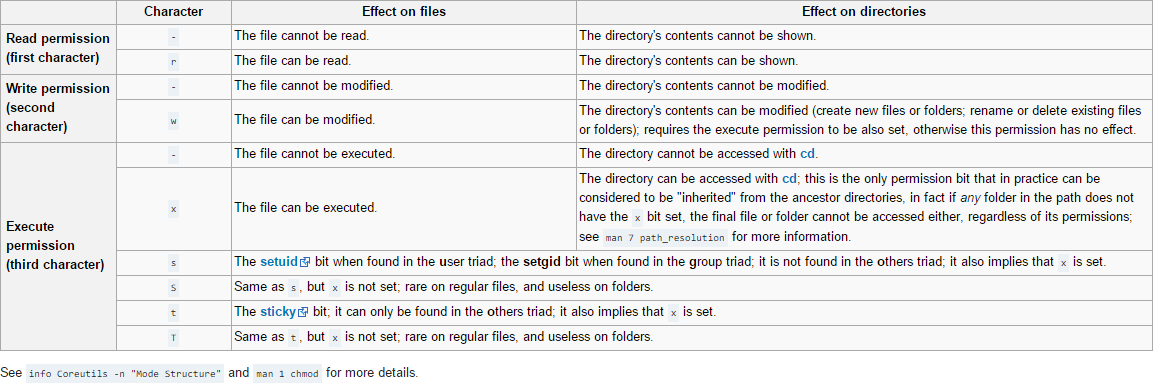
正如上面表格 File-Permissons-Characters 所示,权限对普通文件和目录有不同的影响。
对文件的作用
- r : 可以读取文件内容(cat more head tail)
- w : 可以编辑、新增、修改文件内容(vi echo),但不包括文件的删除,因为文件名称是保存在所在目录的空间。
- x : 可以执行
对文件,最高权限是 x
对目录的作用
- r : 可以查询目录(ls)
- w : 可以修改目录结构。新建、删除、重命名和剪切等(touch mkdir rm mv)
- x : 可以进入目录(cd)
对目录来说,最高权限是 w,有意义的目录权限只有 7(rwx) 5(r-x) 或 0(—) 三种表示。
SETUID 和 SETGID
SETUID 和 SETGID 对可执行文件的作用
When an executable file has been given the setuid attribute, normal users on the system who have permission to execute this file gain the privileges of the user who owns the file (commonly root) within the created process.[2] When root privileges have been gained within the process, the application can then perform tasks on the system that regular users normally would be restricted from doing. The invoking user will be prohibited by the system from altering the new process in any way
SETUID 和 SETGID 对目录的作用
The setuid and setgid flags, when set on a directory, have an entirely different meaning.
Setting the setgid permission on a directory (“chmod g+s”) causes new files and subdirectories created within it to inherit its group ID, rather than the primary group ID of the user who created the file (the owner ID is never affected, only the group ID). Newly created subdirectories inherit the setgid bit. Thus, this enables a shared workspace for a group without the inconvenience of requiring group members to explicitly change their current group before creating new files or directories. Note that setting the setgid permission on a directory only affects the group ID of new files and subdirectories created after the setgid bit is set, and is not applied to existing entities.
这会对安全性有重大影响,例如:如果给 /bin/vi 赋予 SETUID 权限,那么普通用户就可以使用 vi 的 绝对路径 查看 root 信息。
$ chmod u+s /bin/vi
$ ll /bin/vi
-rwsr-xr-x. 1 root root 845932 Dec 22 01:06 /bin/vi
$ /bin/vi /etc/shadow #能够查看用户密码信息SETUID 设置在所有者(u)的权限中,SETGID 设置在所属组(g)的权限中。SETUID 和 SETGID 用 s 或 S 表示
Stick
Umask
Linux 对新创建的文件和目录的权限设置具有默认行为。root 用户默认情况下新创建的文件的权限是 644 ,新创建的目录的权限是 755。这个初始的权限是根据系统定义的 mode mask 来确定。
查看系统当前用户下的 umask 值:
$ umask
0022
0022 中第一个 0 表示文件的 setuid gid。
文件默认不能建立为可执行文件,必须手动赋予执行权限,所以文件一旦建立后的权限最大为八进制表示的 666 ,而目录是 777。
计算方法为:先对 umask 值做逻辑取反为 ~M ,在将最大权限 D 与 ~M 做逻辑与运算
R: (D & (~M))
R: 新建文件或目录的权限初始值
D: 新建文件或目录的默认权限
M: umask 值
- 临时修改 umask 0002
$ umask 0000 #修改了 umask 值
$ umask
0000- 永久修改 vi /etc/profile
# By default, we want umask to get set. This sets it for login shell
# Current threshold for system reserved uid/gids is 200
# You could check uidgid reservation validity in
# /usr/share/doc/setup-*/uidgid file
if [ $UID -gt 199 ] && [ "`id -gn`" = "`id -un`" ]; then
    umask 002
else
    umask 022
更改文件权限
更改文件权限的命令有:chmod chown chgrp。
chmod 命令
chmod [OPTION]… MODE[,MODE]… FILE…
- OPTION
- -R 递归
- MODE
- [ugoa][+-=][[rwx][ugo]]
- [mode=1到4位8进制数字]
- OPTION
chmod [OPTION]… OCTAL-MODE FILE…
- OCTAL-MODE
- 1到4位8进制数字,0 开头可以忽略
- OCTAL-MODE
DESCRIPTION
The format of a symbolic mode is
[ugoa...][[+-=][perms...]...], where perms is either zero or more letters from the set rwxXst, or a single letter from the set ugo. Multiple symbolic modes can be given, separated by commas.
注: 当 perms 是 ugo 中的 一个 字母时表示复制权限。
A combination of the letters ugoa controls which users’ access to the file will be changed: the user who owns it (u), other users in the file’s group (g), other users not in the file’s group (o), or all users (a). If none of these are given, the effect is as if a were given, but bits
that are set in the umask are not affected.The operator + causes the selected file mode bits to be added to the existing file mode bits of each file; - causes them to be removed; and = causes them to be added and causes unmentioned bits to be removed except that a directory’s unmentioned set user and group ID bits are not affected.
= 说明:
假设文件 test 的权限是 rwxrw-rw-, 执行 chmod u=rw test 的结果是 rw-rw-rw-*,在原模式 *rwxrw-rw- 中有但在 u=rw 中没有的
x 会被移除,这就类似于完全的赋值。但是对于含有 setuid 或 setgid 的目录,如此赋值,不会删除 setuid 和 setgid,其他的 rwx 还是会删除。例如:
有一个目录 dir 权限是: rwsr-xr-x*,执行 chmod u= dir 的结果是 *–Sr-xr-x ,其 rwx 删除了,但是 s 或者 S 没有被删除。
The letters rwxXst select file mode bits for the affected users: read (r), write (w), execute (or search for directories) (x), execute/search only if the file is a directory or already has execute permission for some user (X), set user or group ID on execution (s), restricted deletion flag or sticky bit (t). Instead of one or more of these letters, you can specify exactly one of the letters ugo: the permissions granted to the user who owns the file (u), the permissions granted to other users who are members of the file’s group (g), and the permissions granted to users that are in neither of the two preceding categories (o).
A numeric mode is from one to four octal digits (0-7), derived by adding up the bits with values 4, 2, and 1. Omitted digits are assumed to be leading zeros. The first digit selects the set user ID (4) and set group ID (2) and restricted deletion or sticky (1) attributes. The second digit selects permissions for the user who owns the file: read (4), write (2), and execute (1); the third selects permissions for other users in the file’s group, with the same values; and the fourth for other users not in the file’s group, with the same values.
chmod never changes the permissions of symbolic links; the chmod system call cannot change their permissions. This is not a problem since the permissions of symbolic links are never used. However, for each symbolic link listed on the command line, chmod changes the permissions of the pointed-to file. In contrast, chmod ignores symbolic links encountered during recursive directory traversals.
SETUID AND SETGID BITS
chmod clears the set-group-ID bit of a regular file if the file’s group ID does not match the user’s effective group ID or one of the user’s supplementary group IDs, unless the user has appropriate privileges. Additional restrictions may cause the set-user-ID and set-group-ID bits of MODE or RFILE to be ignored. This behavior depends on the policy and functionality of the underlying chmod system call. When in doubt, check the underlying system behavior.
chmod preserves a directory’s set-user-ID and set-group-ID bits unless you explicitly specify otherwise. You can set or clear the bits with symbolic modes like u+s and g-s, and you can set (but not clear) the bits with a numeric mode.
RESTRICTED DELETION FLAG OR STICKY BIT
The restricted deletion flag or sticky bit is a single bit, whose interpretation depends on the file type. For directories, it prevents unprivileged users from removing or renaming a file in the directory unless they own the file or the directory; this is called the restricted deletion flag for the directory, and is commonly found on world-writable directories like /tmp. For regular files on some older systems, the bit saves the program’s text image on the swap device so it will load more quickly when run; this is called the sticky bit.
chown 命令
chown 用于更改文件的所有者和所属组。
NAME
chown - change file owner and group
SYNOPSIS
chown [OPTION]… [OWNER][:[GROUP]] FILE…
chown [OPTION]… –reference=RFILE FILE…
DESCRIPTION
This manual page documents the GNU version of chown. chown changes the user and/or group ownership of each given file.
If only an owner (a user name or numeric user ID) is given, that user is made the owner of each given file, and the files’ group is not changed.
If the owner is followed by a colon and a group name (or numeric group ID), with no spaces between them, the group ownership of the files is changed as well.
If a colon but no group name follows the user name, that user is made the owner of the files and the group of the files is changed to that user’s login group.
If the colon and group are given, but the owner is omitted, only the group of the files is changed; in this case, chown
performs the same function as chgrp.
If only a colon is given, or if the entire operand is empty, neither the owner nor the group is changed.
OPTIONS
Change the owner and/or group of each FILE to OWNER and/or GROUP. With –reference, change the owner and group of each FILE to those of RFILE.
-c, –changes
like verbose but report only when a change is made
–dereference
affect the referent of each symbolic link (this is the default), rather than the symbolic link itself
-h, –no-dereference
affect each symbolic link instead of any referenced file (useful only on systems that can change the ownership of a symlink)
–from=CURRENT_OWNER:CURRENT_GROUP
change the owner and/or group of each file only if its current owner and/or group match those specified here. Either may be omitted, in
which case a match is not required for the omitted attribute.
–no-preserve-root
do not treat ‘/’ specially (the default)
–preserve-root
fail to operate recursively on ‘/’
-f, –silent, –quiet
suppress most error messages
–reference=RFILE
use RFILE’s owner and group rather than specifying OWNER:GROUP values
-R, –recursive
operate on files and directories recursively
-v, –verbose
output a diagnostic for every file processed
The following options modify how a hierarchy is traversed when the -R option is also specified. If more than one is specified, only the final
one takes effect.
-H if a command line argument is a symbolic link to a directory, traverse it
-L traverse every symbolic link to a directory encountered
-P do not traverse any symbolic links (default)
–help display this help and exit
–version
output version information and exit
Owner is unchanged if missing. Group is unchanged if missing, but changed to login group if implied by a ‘:’ following a symbolic OWNER.
OWNER and GROUP may be numeric as well as symbolic.
chgrp 命令
chgrp 用于更改文件所属组。
NAME
chgrp - change group ownershipSYNOPSIS
   chgrp [OPTION]... GROUP FILE...
   chgrp [OPTION]... --reference=RFILE FILE...
DESCRIPTION
Change the group of each FILE to GROUP. With –reference, change the group of each FILE to that of RFILE.
-c, –changes
like verbose but report only when a change is made
–dereference
affect the referent of each symbolic link (this is the default), rather than the symbolic link itself
-h, –no-dereference
affect each symbolic link instead of any referenced file (useful only on systems that can change the ownership of a symlink)
–no-preserve-root
do not treat ‘/’ specially (the default)
–preserve-root
fail to operate recursively on ‘/’
-f, –silent, –quiet
suppress most error messages
–reference=RFILE
use RFILE’s group rather than specifying a GROUP value
-R, –recursive
operate on files and directories recursively
-v, –verbose
output a diagnostic for every file processed
The following options modify how a hierarchy is traversed when the -R option is also specified. If more than one is specified, only the final
one takes effect.
-H if a command line argument is a symbolic link to a directory, traverse it
-L traverse every symbolic link to a directory encountered
-P do not traverse any symbolic links (default)
–help display this help and exit
–version
output version information and exit
EXAMPLES
chgrp staff /u
Change the group of /u to “staff”.
chgrp -hR staff /u
Change the group of /u and subfiles to “staff”.
File Attributes
The letters ‘acdeijstuADST’ select the new attributes for the files: append only (a), compressed (c), no dump (d), extent format (e), immutable (i), data journalling (j), secure deletion (s), no tail-merging (t), undeletable (u), no atime updates (A), synchronous directory updates (D), synchronous updates (S), and top of directory hierarchy (T).
A file with the ‘a’ attribute set can only be open in append mode for writing. Only the superuser or a process possessing the CAP_LINUX_IMMUTABLE capability can set or clear this attribute.
A file with the ‘i’ attribute cannot be modified: it cannot be deleted or renamed, no link can be created to this file and no data can be written to the file. Only the superuser or a process possessing the CAP_LINUX_IMMUTABLE capability can set or clear this attribute.